
Wondering whether ChatGPT vs Google is better for learning? Compare their strengths, weaknesses, real-world use cases, and discover which tool fits your learning style.
A few years ago, “just Google it” was the default response to almost any question. Today, a growing number of students, professionals, and lifelong learners open ChatGPT first — and only turn to Google if they need more.
That shift raises a real question: is Google becoming obsolete for learning, or is something more nuanced happening?
The honest answer is that ChatGPT vs Google for learning isn’t really a competition with one winner. Each tool is built for a different job. ChatGPT is designed to explain, personalize, and converse. Google is designed to discover, verify, and surface the freshest information from across the entire web. Understanding when to use each one — and how to combine them — is what actually makes you a faster, smarter learner.
In this guide, you’ll learn:
- What ChatGPT and Google actually do differently
- A side-by-side comparison across speed, accuracy, research, and homework
- The strengths and weaknesses of each tool, backed by real examples
- Which tool wins for students, professionals, and researchers
- 30+ real-world scenarios showing exactly when to use ChatGPT or Google
- A step-by-step workflow for using both tools together
- Common mistakes learners make with AI — and how to avoid them
- Expert tips and an FAQ section answering the questions people ask most
How We Evaluated ChatGPT vs Google for Learning
To keep this comparison practical rather than theoretical, each section below is built around the actual tasks learners face day to day: homework, exam prep, research papers, coding, language practice, and professional upskilling. We looked at speed, accuracy, depth of research, ease of use, and how well each tool supports real understanding rather than just quick answers. Where a claim depends on fast-changing information — like AI model capabilities or search features — we’ve noted that readers should double-check current details directly on OpenAI’s and Google’s official documentation, since both platforms update frequently.
What Is ChatGPT?
ChatGPT is a conversational AI assistant built by OpenAI. Instead of returning a list of links like a search engine, it generates direct, personalized answers based on the context of your conversation.
For learning, ChatGPT is useful because it can:
- Hold a conversation — you can ask follow-up questions and it remembers the context
- Explain concepts at your level — from a five-year-old’s explanation to a graduate-level breakdown
- Answer questions directly — no scrolling through ten articles to find the answer
- Act as a tutor — walking you through problems step by step
- Brainstorm ideas — for essays, projects, or business plans
- Summarize long material — textbook chapters, articles, or reports
- Help with coding — writing, explaining, and debugging code
- Assist with writing — outlines, drafts, grammar, and tone
Think of ChatGPT as a patient, always-available tutor who can adapt its explanation the moment you say “I still don’t get it.”
What Is Google Search?
Google Search is the world’s largest search engine. Rather than generating answers itself, it indexes billions of web pages and ranks them so you can find the most relevant, authoritative sources for your query.
For learning, Google is useful because it gives you access to:
- Millions of independent sources, not one generated response
- Academic papers through Google Scholar
- Government and official websites (.gov, .edu domains)
- Research journals and peer-reviewed studies
- YouTube tutorials for visual, hands-on learning
- Breaking news and real-time developments
- Multiple expert opinions, so you can compare perspectives
- Product comparisons and reviews for practical decisions
Google’s real strength is discovery and verification. It doesn’t tell you what to think — it shows you where to look.
ChatGPT vs Google at a Glance
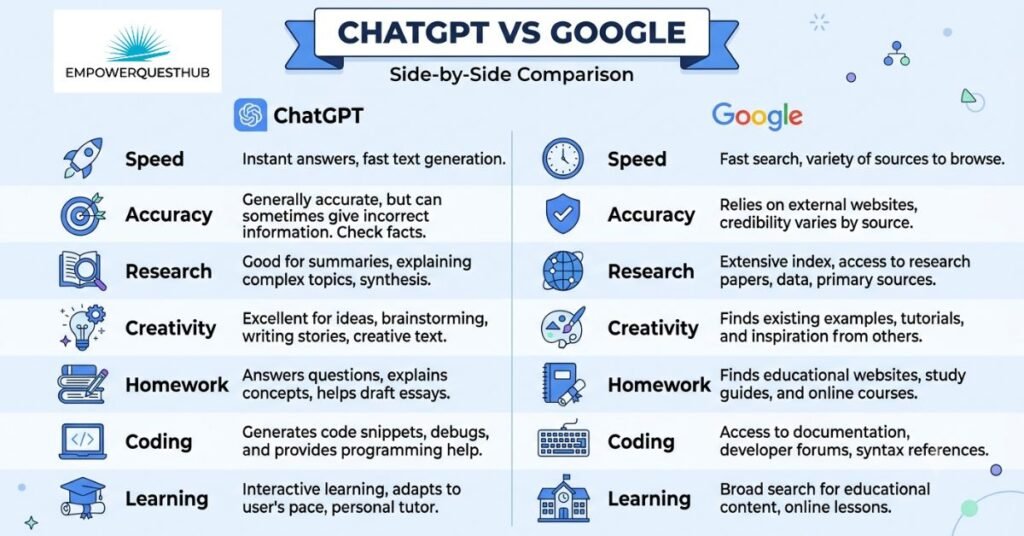
Here’s a quick-reference comparison table for ChatGPT vs Google for learning:
| Factor | ChatGPT | Google Search |
| Speed | Instant, direct answers | Fast, but requires clicking through results |
| Accuracy | Generally strong, but can hallucinate | High when sourced from authoritative sites |
| Learning style | Conversational, adaptive | Self-directed, exploratory |
| Research depth | Good for summaries, weak on primary sources | Excellent — direct access to primary sources |
| Homework help | Strong for explanations and practice | Strong for verified facts and citations |
| Coding help | Excellent — writes and debugs code | Good — via documentation and forums |
| Creativity | Excellent for brainstorming and drafting | Limited — mostly reference material |
| Up-to-date information | Improved in 2026, but can lag breaking news | Best-in-class, real-time |
| Citations | Often missing or generalized | Direct links to original sources |
| Personalization | High — adapts to your level and goals | Low — same results for everyone |
| Ease of use | Very easy, conversational | Easy, but requires evaluating sources |
| Critical thinking | Can shortcut it if overused | Encourages comparison and evaluation |
How ChatGPT Helps You Learn

ChatGPT’s biggest advantage is that it meets you exactly where you are.
- Explains difficult concepts simply. Ask it to explain photosynthesis “like I’m 12” or “like I’m a biology major,” and it adjusts instantly.
- Acts like a personal tutor. It can walk through a calculus problem step by step, checking your understanding along the way.
- Adapts to your level. Struggling with a topic? Ask it to slow down or use a different analogy.
- Creates quizzes and flashcards. Turn a chapter of notes into ten practice questions in seconds.
- Summarizes long material. Paste in a dense article and ask for a plain-language summary.
- Generates practice questions. Great for exam prep across almost any subject.
- Supports language learning. Practice conversational Spanish, get grammar corrections, or build vocabulary lists.
- Helps with coding. Explain an error message, generate a function, or walk through a concept like recursion.
- Explains math step by step. Show your work, and it can identify exactly where a mistake happened.
- Sparks brainstorming. Stuck on an essay topic or project idea? ChatGPT can generate a dozen angles in seconds.
Example: A student preparing for a chemistry exam pastes in their notes and asks ChatGPT to “create 15 practice questions with explanations.” Within seconds, they have a custom study guide tailored to their exact material — something Google can’t do directly.
How Google Helps You Learn
Google’s strength lies in the sheer breadth and verifiability of what it can surface.
- Access to millions of sources, so you’re never relying on a single perspective
- Academic papers via Google Scholar for citation-ready research
- Government websites for verified statistics, laws, and public data
- Official documentation — essential for coding, software, and technical work
- Research journals for peer-reviewed, evidence-based information
- YouTube tutorials for visual and hands-on subjects like repairs, art, or physical skills
- News coverage for current events and breaking developments
- Expert opinions from multiple independent voices, letting you compare viewpoints
- Comparison shopping and reviews for practical, real-world decisions
- Latest discoveries in science, technology, and medicine, often before AI models are updated
Example: A researcher studying recent developments in renewable energy policy searches Google to find government reports, news coverage, and academic studies published within the last week — information that may not yet be reflected in an AI model’s training
Strengths of ChatGPT
- Personalized answers tailored to your knowledge level and goals
- Interactive, back-and-forth conversations instead of static pages
- Saves time by reducing the need to open dozens of browser tabs
- Instant explanations without ads or distractions
- Boosts productivity through study planning and organization
- Strong writing and editing support
- Excellent for brainstorming and idea generation
Strengths of Google
- Real-time information, especially for breaking news and current events
- Easier source verification through direct links
- Exposure to multiple viewpoints and expert opinions
- Access to official documents, laws, and primary sources
- Proper citations for academic and professional work
- Strong coverage of scholarly, peer-reviewed resources
Weaknesses of ChatGPT
No tool is perfect, and being aware of ChatGPT’s limitations is part of using it responsibly.
- Occasional hallucinations — it can state incorrect information confidently
- Knowledge gaps — depending on the version, it may not reflect the very latest developments
- Overconfidence — it rarely says “I don’t know” unless prompted to
- Missing or generalized citations — it doesn’t always show exactly where information came from
- Requires fact-checking — especially for statistics, dates, and technical claims
Callout: Always verify important facts — statistics, medical information, legal details, or anything high-stakes — using an authoritative source before relying on them.
Weaknesses of Google
Google has its own real limitations for learners.
- Information overload — too many results, and no clear starting point
- SEO spam — content optimized for rankings rather than accuracy
- Ads — sponsored content can crowd out genuinely useful results
- Conflicting advice — different sources often disagree
- Time-consuming — research can take much longer than getting a direct answer
Which Tool Is Better for Different Learning Tasks?
| Task | Better Tool | Why |
| Homework | ChatGPT | Direct, personalized explanations |
| Research | Access to primary and scholarly sources | |
| Programming | ChatGPT | Writes, explains, and debugs code |
| Writing | ChatGPT | Drafting, editing, and structuring support |
| Language learning | ChatGPT | Interactive conversation practice |
| Math | ChatGPT | Step-by-step problem solving |
| Science | Both | ChatGPT explains; Google verifies with journals |
| History | Primary sources and varied perspectives matter | |
| Exam preparation | ChatGPT | Custom quizzes and practice questions |
| Professional development | Both | Google for courses/certs; ChatGPT for skill-building |
| Career skills | ChatGPT | Personalized coaching and practice |
| Business learning | Both | Google for data; ChatGPT for strategy support |
| Cooking | Visual, YouTube-based tutorials | |
| DIY projects | Video tutorials and community forums | |
| Health information | Verified, authoritative medical sources | |
| Travel planning | Both | Google for logistics; ChatGPT for itinerary drafts |
ChatGPT vs Google for Students
Students juggle homework, revision, and exam prep — and each tool plays a different role.
- Homework: ChatGPT is excellent for explaining a concept you missed in class, but you should still verify factual claims.
- Note-taking: Paste lecture notes into ChatGPT and ask for a cleaner, organized summary.
- Revision: Generate flashcards or practice questions from your own study material.
- Exam preparation: Ask ChatGPT to quiz you repeatedly until you get consistent answers right.
- Essay planning: Use ChatGPT to brainstorm structure, then use Google to find sources that support your argument.
- Citations: Google Scholar remains the more reliable source for proper academic citations.
- Studying smarter, not harder: Combine both — Google for facts, ChatGPT for understanding.
ChatGPT vs Google for Professionals
For working professionals, the goal shifts from grades to applied skills.
- Skill development: ChatGPT can coach you through new concepts at your own pace
- Coding: ChatGPT for writing and debugging; Google for official documentation
- Presentations: ChatGPT helps draft outlines and talking points quickly
- Business strategy: Google for market data and competitor research
- Productivity: ChatGPT can help plan schedules, summarize meetings, and draft emails
- Marketing: Google for trend research; ChatGPT for content ideation
- Communication: ChatGPT helps refine tone and clarity in professional writing
ChatGPT vs Google for Researchers
Serious researchers rarely rely on just one tool — they combine several:
- Google Scholar for peer-reviewed, citable sources
- Academic databases (JSTOR, PubMed, IEEE) for primary research
- ChatGPT for summarizing dense papers into plain language
- AI summarization to quickly scan whether a paper is relevant before reading it in full
This combination lets researchers work faster without sacrificing rigor — as long as they verify AI-generated summaries against the original source. A typical workflow looks like this: a researcher searches Google Scholar for recent papers on their topic, skims abstracts to identify the most relevant five or six studies, then feeds key excerpts into ChatGPT to get a plain-language summary of methodology and findings before committing to a full read. This doesn’t replace close reading — it simply helps prioritize which papers deserve that deeper attention first. For literature reviews, citation formatting, and confirming that a study is peer-reviewed, Google Scholar and institutional databases remain the more trustworthy starting point, since AI-generated citations can occasionally be incomplete or slightly inaccurate
When Should You Use ChatGPT?
- You need a concept explained in simpler terms
- You want a personalized study plan
- You’re stuck on a coding error
- You need practice questions for an exam
- You want to brainstorm essay or project ideas
- You need help outlining a paper
- You’re learning a new language and want conversation practice
- You need a quick summary of a long document
- You want feedback on your writing
- You’re solving a math problem step by step
- You need flashcards from your notes
- You want to role-play an interview or presentation
- You need help simplifying technical jargon
- You want a second opinion on your understanding of a topic
- You’re drafting an email or professional message
- You need help organizing your study schedule
- You want to explore “what if” scenarios or hypotheticals
When Should You Use Google?
- You need the latest news or current events
- You’re fact-checking a claim
- You need an academic citation
- You’re looking for government statistics or data
- You want to compare multiple expert opinions
- You need official documentation for software or tools
- You’re researching medical symptoms (and should consult a professional)
- You need a visual, step-by-step video tutorial
- You’re comparing product reviews before a purchase
- You need a peer-reviewed study
- You’re researching a company or organization
- You want local information (store hours, directions, events)
- You need legal information from an official source
- You’re checking whether information is current or outdated
- You want to explore original source material directly
- You need images, diagrams, or maps
- You’re researching breaking developments in a fast-moving field
The Best Strategy: Use Both Together
The most effective learners don’t pick a side — they build a workflow that uses each tool for what it does best.
- Start with Google to find reliable, authoritative sources on your topic.
- Verify the information by checking multiple sources and dates.
- Bring it to ChatGPT to simplify complex ideas into plain language.
- Ask follow-up questions until you genuinely understand the concept.
- Create summaries of what you’ve learned in your own words.
- Generate quizzes from the material to test your retention.
- Build a study plan around the topics you’re weakest on.
- Review key ideas regularly, using spaced repetition.
Callout box: This “Google to discover, ChatGPT to understand” workflow is one of the most effective ways to learn faster without sacrificing accuracy.
Common Mistakes People Make
- Trusting AI blindly — treating every ChatGPT answer as fact without verification
- Relying on a single source — whether that’s one website or one AI response
- Copying homework directly — this skips the actual learning process
- Not verifying facts — especially statistics, dates, and technical details
- Writing poor prompts — vague questions get vague, less useful answers
- Ignoring critical thinking — outsourcing your judgment instead of using AI to support it
- Never cross-checking Google results — assuming the top result is always the most accurate one
Expert Tips for Smarter Learning with AI
- Always verify high-stakes facts (medical, legal, financial) with authoritative sources.
- Write specific, detailed prompts — the more context you give ChatGPT, the better the answer.
- Ask ChatGPT to explain its reasoning, not just give a final answer.
- Use Google Scholar instead of general search for academic work.
- Cross-check dates — AI knowledge can lag behind real-time events.
- Ask ChatGPT to quiz you instead of just summarizing material.
- Bookmark primary sources you find on Google for future reference.
- Use ChatGPT to turn passive reading into active recall exercises.
- Compare at least two independent sources before accepting a claim as fact.
- Ask ChatGPT to explain a topic multiple ways if the first explanation doesn’t click.
- Use Google’s “tools” filters (time range, source type) to narrow results.
- Treat ChatGPT as a study partner, not a replacement for your own thinking.
- Use ChatGPT to simplify jargon before diving into a dense academic paper.
- Set a personal rule: never submit AI-generated work without reviewing and editing it yourself.
- Combine visual learning (YouTube via Google) with conversational learning (ChatGPT) for topics you find difficult.
- Revisit and review material over multiple sessions rather than cramming once.
Frequently Asked Questions (FAQ)
Is ChatGPT replacing Google?
No. ChatGPT and Google serve different purposes — one generates personalized explanations, the other indexes and surfaces existing sources. Most learners now use both.
Is ChatGPT more accurate than Google?
Not necessarily. Google connects you directly to original sources, while ChatGPT generates responses that can occasionally contain errors. For fact-sensitive topics, verifying with Google or another authoritative source is recommended.
Can ChatGPT help with homework?
Yes, ChatGPT is effective for explaining concepts, checking your understanding, and generating practice problems. It should support your learning, not replace the work of actually doing it.
Should students rely on ChatGPT?
ChatGPT is a helpful study companion, but relying on it exclusively can weaken research and critical-thinking skills. Combining it with independent research is a more balanced approach.
Is Google better for research?
For accessing primary sources, academic papers, and verifiable citations, yes — Google (and Google Scholar specifically) generally outperforms ChatGPT.
Can ChatGPT access the latest information?
This depends on the version and any browsing features enabled. Even with updates, Google typically has an edge for real-time, breaking information.
Which tool is free?
Both offer free versions. Google Search is entirely free, while ChatGPT offers a free tier alongside paid plans with additional features.
Can I use both together?
Yes — and most experts recommend it. Use Google to discover and verify sources, then use ChatGPT to simplify and reinforce your understanding.
Is ChatGPT good for coding?
Yes, ChatGPT is widely used for writing, explaining, and debugging code. Official documentation (found via Google) remains important for accuracy on specific tools and frameworks.
Which is better for exam preparation?
ChatGPT is strong for generating personalized quizzes and practice questions, while Google helps you locate additional study materials and verify facts you’re unsure about.
Conclusion: So, Which Is Better for Learning — ChatGPT or Google?
The truth is that ChatGPT vs Google for learning isn’t a fair fight, because they aren’t built to do the same job.
- ChatGPT excels at explanation, personalization, and interactive tutoring.
- Google excels at discovery, verification, and access to current, authoritative information.
- Neither tool is universally better — the right choice depends on the task in front of you.
- The smartest learners combine both, using Google to find and verify reliable sources, and ChatGPT to understand and retain what they’ve learned.
If you want to learn faster and more effectively in 2026, stop asking “ChatGPT or Google?” and start asking “which one fits this specific task?”
What’s your go-to learning tool — ChatGPT, Google, or both? Share your workflow in the comments, and explore more of our AI productivity guides to keep building smarter study habits.