
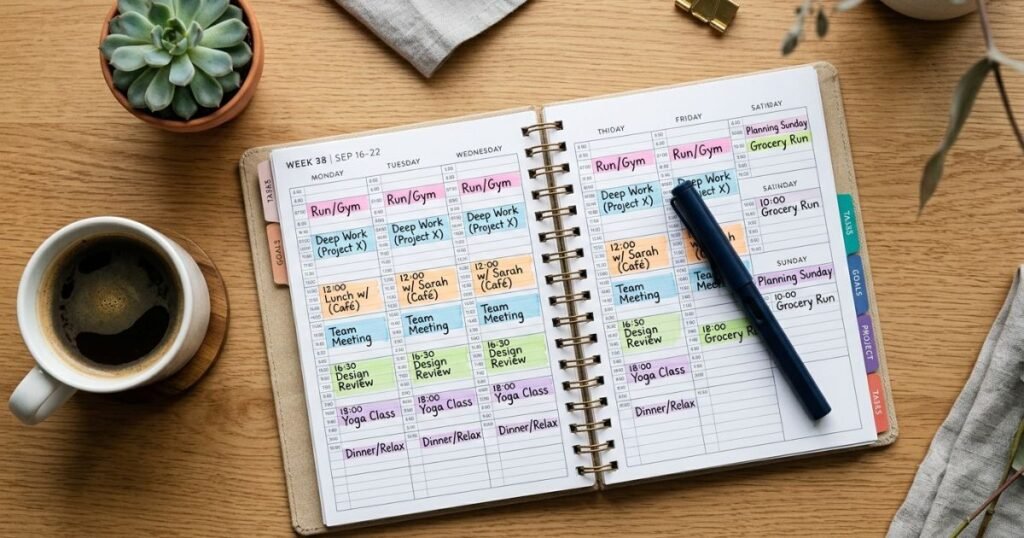
Discover the best time-blocking planners and productivity notebooks to boost focus, beat procrastination, and organize your day effectively.
If your to-do list keeps growing while your actual progress stays flat, you’re not alone. Most people don’t struggle with knowing what needs to get done — they struggle with when it’s going to happen. Tasks pile up, deadlines creep closer, and busy days somehow end with nothing important actually finished.
This is exactly the problem time blocking was designed to solve. Instead of a never-ending list of tasks competing for attention, time blocking gives every task a specific home on your calendar. And while you can technically time block with any blank notebook, having one of the best time-blocking planners built specifically for this method makes the habit far easier to stick with.
In this guide, we’ll break down what time blocking actually is, what to look for in a planner, and review some of the best time-blocking planners and productivity notebooks currently available — so you can pick the one that fits your workflow, your schedule, and your budget.
What Is Time Blocking?
Time blocking is a scheduling method where you divide your day into dedicated blocks of time, and assign one task (or one type of task) to each block. Instead of writing “finish report” on a to-do list and hoping you get to it, you decide exactly when you’ll work on it — for example, 9:00–10:30 AM.
A to-do list tells you what to do. Time blocking tells you when you’ll do it. To-do lists are easy to create but easy to ignore; time blocking forces you to confront how much time you actually have versus how much you’re trying to cram into a day.
How to divide your day into time blocks:
- Start with fixed commitments (meetings, classes, appointments)
- Identify your 2–4 most important tasks for the day
- Assign your most demanding work to your highest-energy hours
- Group similar small tasks (emails, calls) into a single block
- Leave buffer blocks between tasks for overruns and transitions
Why visual scheduling helps:
Seeing your day mapped out on paper makes overcommitment obvious immediately. If your task list won’t physically fit into the hours you have, you’ll know before your day starts — not at 6 PM when everything is still undone.
Who benefits most from time blocking:
Busy professionals, students juggling coursework, entrepreneurs and freelancers managing multiple clients, remote workers without built-in structure, parents balancing household and personal goals, and anyone who tends to procrastinate on open-ended tasks all tend to see real benefits from this method.
What Makes a Good Time-Blocking Planner?
Not every planner is built for time blocking. Here’s what actually matters when comparing options.
- Time-blocking layout – Look for pages with a visible daily timeline, not just blank lines.
- Hourly scheduling – Hour-by-hour columns make it easier to assign realistic time slots.
- Daily vs. weekly planning – Daily layouts suit detailed schedulers; weekly layouts suit people who want a broader view.
- Goal-setting sections – Monthly or quarterly goal pages help connect daily blocks to bigger objectives.
- Priority lists – A dedicated “top 3 tasks” section keeps your day focused, not just full.
- Habit tracking – Useful if you’re trying to build consistency alongside scheduling.
- Notes space – Room for stray thoughts keeps your time-blocking grid uncluttered.
- Task management – Checkboxes or task carryover sections for unfinished items.
- Paper quality – Matters for pen type; thicker paper resists ghosting and bleed-through.
- Binding and durability – Lay-flat binding (like disc-bound or hardcover) makes daily use easier.
- Portability – A5 or similar sizes travel better than large desk planners.
- Undated vs. dated format – Undated planners let you start anytime; dated ones build in accountability.
- Size and usability – Should match how and where you’ll actually use it (desk, bag, commute).
- Price and overall value – A higher price isn’t automatically better; it should match the features you’ll actually use.
Specifications, prices, and exact page counts change over time and vary by seller — always verify current details before purchasing.
Best Time-Blocking Planners and Productivity Notebooks
1. Full Focus Planner
Best for: Goal-driven professionals who want their daily schedule tied to bigger quarterly goals.
Key features: Quarterly goal-setting section, daily time-blocking grid, daily “big 3” priorities, weekly preview and review pages.
Pros:
- Strong goal-to-daily-task connection
- Structured weekly review process builds reflection into the habit
- Hardcover, durable build
- Guided prompts help beginners use the system correctly
Cons:
- Premium pricing compared to basic notebooks
- Structured format may feel rigid for very flexible schedules
Why we recommend it: It’s one of the few planners that explicitly links long-term goals to daily time blocks, rather than treating scheduling and goal-setting as separate systems.
Best use case: Professionals and entrepreneurs who want accountability built into their planning process.
Value for money: Justified if you’ll actually use the goal-setting sections; overkill if you only want a simple daily schedule.
2. Panda Planner Pro
Best for: Beginners who want a balance of time blocking, gratitude, and habit tracking.
Key features: Hourly daily schedule, gratitude prompts, habit tracker, weekly and monthly overview pages.
Pros:
- Combines productivity with wellbeing-focused prompts
- Clear, easy-to-follow hourly layout
- Undated format allows starting anytime
- Compact and travel-friendly
Cons:
- Wellbeing prompts may feel unnecessary to purely task-focused users
- Limited space for very detailed daily notes
Why we recommend it: It softens the intensity of strict time blocking with prompts that encourage reflection, which can help with long-term consistency.
Best use case: People newer to time blocking who also want light habit and mindset tracking.
Value for money: Solid mid-range option for the features included.
3. Passion Planner
Best for: Creatives, students, and freelancers who want flexibility alongside structure.
Key features: Hourly time-blocking grid, dedicated “space dump” for miscellaneous notes, monthly goal-setting roadmap pages, customizable undated format.
Pros:
- Highly flexible, undated start
- Space dump section keeps the schedule grid uncluttered
- Wide range of cover and layout options
- Strong community and template resources online
Cons:
- Some users find the layout busy at first
- Weekly spreads can feel tight for very packed schedules
Why we recommend it: It gives you a genuine hour-by-hour grid without locking you into a rigid corporate-style format.
Best use case: Students, freelancers, and creatives who want scheduling structure without losing flexibility.
Value for money: Reasonable for the amount of customization and planning space included.
4. Clever Fox Planner
Best for: People who want an all-in-one productivity and time-blocking system.
Key features: Daily hourly schedule, goal-setting worksheets, habit tracker, expense tracker, undated monthly layout.
Pros:
- Combines multiple planning systems in one notebook
- Durable hardcover and lay-flat binding
- Includes stickers and bonus planning tools in many editions
- Undated, so it can start any month
Cons:
- Can feel like “too much planner” if you only want simple time blocking
- Habit and expense sections take up space some users won’t use
Why we recommend it: For readers who want time blocking bundled with broader life organization tools, it consolidates several systems into one notebook.
Best use case: People who want one notebook to handle scheduling, goals, and habit tracking together.
Value for money: Good if you’ll use most of the built-in sections; less efficient if you only need the daily schedule.
5. Ink+Volt Planner
Best for: Design-conscious professionals who still want serious functionality.
Key features: Weekly time-blocking layout, goal-setting framework, quarterly check-ins, minimalist design.
Pros:
- Clean, distraction-free page design
- Strong focus on quarterly and weekly goal alignment
- High-quality paper and binding
- Minimal but functional layout
Cons:
- Weekly (not daily) time-blocking grid may be too broad for detail-oriented planners
- Higher price point
Why we recommend it: It appeals to people who want an aesthetically clean planner without sacrificing a genuine goal-and-schedule framework.
Best use case: Professionals who prefer weekly time blocking over hour-by-hour daily grids.
Value for money: Reasonable for the paper quality and design, though best suited to weekly rather than daily planners.
6. BestSelf Co. SELF Journal
Best for: People who want a short-cycle (13-week) accountability system.
Key features: Daily hourly schedule, morning and evening reflection prompts, 13-week goal tracking structure, gratitude section.
Pros:
- Short 13-week cycle keeps goals from feeling distant
- Strong daily reflection habit built in
- Clear hourly time-blocking grid
- Encourages regular course correction
Cons:
- 13-week format means you’ll need a new journal several times a year
- Reflection prompts add time to the daily process
Why we recommend it: The compressed goal cycle makes long-term objectives feel more immediate, which can improve follow-through on daily time blocks.
Best use case: People who respond well to short-term accountability checkpoints.
Value for money: Reasonable per cycle, but costs add up if you replace it every 13 weeks.
7. Erin Condren LifePlanner
Best for: People who want heavy customization and vibrant, visual planning.
Key features: Vertical and horizontal weekly layout options, customizable covers and inserts, goal-tracking pages, sticker sheets in many editions.
Pros:
- Extensive customization options
- Durable, coil-bound layout that lays flat
- Wide layout choices to fit different planning styles
- Strong resale and community following
Cons:
- Weekly (not always hourly daily) layout in standard editions
- Higher price, especially with add-ons
Why we recommend it: For readers who want a planner that’s genuinely enjoyable to use every day, the customization options help build a stickier daily habit.
Best use case: People who want their planner to double as a creative outlet alongside functional scheduling.
Value for money: Depends heavily on how many customization add-ons you choose.
8. The Productivity Planner (Intelligent Change)
Best for: People who want a simple, no-frills time-blocking and prioritization system.
Key features: Daily top-priority task selection, time-boxed task list (not full-day hourly grid), end-of-day reflection, Pomodoro-style time estimates.
Pros:
- Minimalist and fast to fill out
- Encourages realistic time estimation per task
- Compact and easy to carry
- Straightforward for beginners
Cons:
- No full-day hourly time-blocking grid, more of a prioritized task-timer hybrid
- Limited space for notes or long-term goals
Why we recommend it: It’s a good entry point for people who find full hourly grids overwhelming but still want structured, time-aware planning.
Best use case: Beginners or minimalists who want lightweight time awareness without a dense daily grid.
Value for money: Affordable and simple, though less robust than full time-blocking planners for heavier schedules.
Comparison Table
| Planner | Best For | Format | Time Blocking | Goal Tracking | Key Advantage |
| Full Focus Planner | Goal-driven professionals | Dated, hardcover | Daily hourly | Quarterly | Goals linked to daily schedule |
| Panda Planner Pro | Beginners | Undated | Daily hourly | Monthly | Wellbeing + productivity balance |
| Passion Planner | Creatives, students | Undated, customizable | Daily hourly | Monthly roadmap | Flexible, community-backed |
| Clever Fox Planner | All-in-one users | Undated | Daily hourly | Monthly + habits | Multiple systems in one |
| Ink+Volt Planner | Design-conscious pros | Dated, minimalist | Weekly | Quarterly | Clean design, strong paper |
| BestSelf SELF Journal | Short-cycle accountability | 13-week cycle | Daily hourly | 13-week goals | Frequent reflection checkpoints |
| Erin Condren LifePlanner | Customization lovers | Weekly, customizable | Weekly (varies) | Monthly | Extensive personalization |
| Productivity Planner | Minimalists, beginners | Undated | Task-timed, not full grid | Daily only | Simple and fast to use |
Always check the retailer’s current listing for exact specifications before purchasing, as formats and editions can change.
How to Choose the Right Planner
- Students – Look for undated, weekly layouts with space for coursework deadlines and study blocks.
- Professionals – Daily hourly grids with goal-tracking sections work well for meeting-heavy schedules.
- Entrepreneurs – Planners that connect quarterly goals to daily execution (like Full Focus) tend to fit best.
- Freelancers – Flexible, undated planners (like Passion Planner) accommodate irregular client schedules.
- Remote workers – Hourly time-blocking grids help create structure that an office environment would normally provide.
- People with busy schedules – All-in-one planners with habit and task tracking reduce the need for multiple tools.
- Beginners – Simpler, prompt-guided planners (like Panda Planner or The Productivity Planner) ease the learning curve.
- Minimalist planners – Clean, low-prompt layouts (like Ink+Volt) avoid visual clutter.
- Detailed schedulers – Full daily hourly grids with notes sections give the most room to plan precisely.
Time Blocking vs. Traditional To-Do Lists
| Factor | Time Blocking | To-Do List |
| Structure | Assigns specific time to each task | Lists tasks without scheduling |
| Realism | Forces you to confront available hours | Easy to overload with tasks |
| Follow-through | Higher, since tasks have a set start time | Lower, tasks can be pushed indefinitely |
| Flexibility | Requires more planning upfront | Quick to create, less structured |
| Best for | People who procrastinate or overcommit | Simple, low-stakes daily reminders |
Neither method is inherently “better” — many people use a to-do list to capture tasks, then time block the important ones into their calendar.
How to Use a Time-Blocking Planner Effectively
- List your priorities. Write down everything competing for your attention today.
- Estimate how long each task will take. Be realistic — most people underestimate this.
- Assign tasks to specific time blocks. Match demanding tasks to your highest-energy hours.
- Add breaks and buffer time. Leave gaps between blocks for overruns or interruptions.
- Protect deep-work periods. Treat focused blocks like unmovable meetings.
- Review your schedule at the end of the day. Note what worked and what didn’t.
- Adjust tomorrow’s schedule based on what actually happened. Use today’s data to plan more realistically tomorrow.
Example: A freelancer might block 8:00–9:00 AM for email, 9:00–11:30 AM for deep client work, 11:30–12:00 for a break, 12:00–1:00 for calls, and 1:00–3:00 for a second project — with a 3:00–3:30 buffer built in before wrapping up admin tasks.
Common Time-Blocking Mistakes
- Scheduling every minute — leaves no room for the unexpected
- Ignoring breaks — leads to burnout and lower-quality work later in the day
- Underestimating task duration — causes the whole schedule to fall apart
- Creating unrealistic schedules — packing more hours of work than the day allows
- Overloading the day — treating time blocking as a way to fit in more, not focus better
- Failing to prioritize — blocking time for low-value tasks over important ones
- Not leaving buffer time — one delay cascades through the rest of the day
- Treating the planner as a checklist instead of a schedule — defeats the purpose of assigning specific times
Digital vs. Paper Productivity Planners
| Factor | Paper Planner | Digital Planner/Calendar |
| Convenience | Always accessible, no charging | Syncs across devices automatically |
| Flexibility | Fixed once written (unless erasable) | Easy to drag, resize, and edit |
| Distraction levels | Low — no notifications | Higher — phone/app distractions |
| Customization | Limited to what’s printed | Highly customizable templates |
| Portability | Requires carrying a physical item | Always on your phone or laptop |
| Reviewing schedules | Easy to flip back through pages | Easy to search but less tactile |
| Long-term usability | Builds a physical record over time | Easier to archive and duplicate |
Many people find that writing tasks by hand improves focus and retention, while digital tools offer more flexibility for shifting schedules. A hybrid approach — a paper planner for daily time blocking and a digital calendar for recurring events—works well for many users.
Frequently Asked Questions
What is the best planner for time blocking?
It depends on your priorities. Planners with a full daily hourly grid, like the Full Focus Planner or Panda Planner Pro, tend to work best for people who want detailed scheduling.
Is time blocking better than a to-do list?
Time blocking generally leads to better follow-through because it assigns tasks a specific time, but many people combine both methods effectively.
Are productivity planners worth it?
For people who struggle with procrastination or overcommitting, a structured planner can be worth the investment. For others, a simple notebook may work just as well.
How do beginners start time blocking?
Start small — block just your top 2–3 priorities each day rather than scheduling every hour, then expand as the habit sticks.
Should I use a daily or weekly planner?
Choose daily if you want detailed, hour-by-hour scheduling. Choose weekly if you prefer a broader view and more flexibility.
What should a productivity notebook include?
At minimum: a time-blocking grid, space for priorities, and some form of daily or weekly review.
Can time blocking help with procrastination?
Yes — assigning a specific start time to a task makes it harder to indefinitely postpone, unlike an open-ended to-do list.
How many time blocks should I create per day?
Most effective schedules use somewhere between 4–8 blocks, including buffer time — enough structure without over-scheduling.
Final Recommendation
If you want a planner that ties daily scheduling to bigger goals, the Full Focus Planner is a strong choice. If you’re just starting out and want something simpler, Panda Planner Pro or The Productivity Planner are easier entry points. Creatives and freelancers who want flexibility may prefer Passion Planner, while those who want everything in one notebook should look at Clever Fox Planner.
Whichever option fits your workflow, be sure to check the latest price and availability, current customer reviews, and updated specifications before purchasing, since editions and pricing can change over time.