
A social post disappears from the feed within hours. A well-built email list is still reachable a year later — which is exactly why, even with every new channel that’s launched in the last decade, email still quietly outperforms most of them for small business revenue.
The problem isn’t whether to use email marketing. It’s that most small businesses either pick the platform their competitor uses, or the one with the flashiest homepage, and end up paying for automation features they never touch. This guide compares five of the strongest email marketing platforms for small businesses right now, based on who each one actually fits — not a generic “best of” ranking. It’s a natural next step if you’ve already read our guide on building a content marketing strategy that generates leads, since email is usually where that content strategy turns into repeat revenue.
Quick Answer
The best email marketing software depends on where you are right now. Mailchimp is the most recognizable all-in-one option and the easiest to start with if you’re brand new. MailerLite offers the best balance of features and price for small teams on a tight budget. ActiveCampaign is the strongest choice once you need real behavior-based automation, not just scheduled newsletters. Constant Contact stands out for hands-on support and simplicity, especially for non-technical teams. Brevo is worth a look if you want CRM and email marketing in one affordable platform. There’s no single winner — the right pick depends on your list size, technical comfort, and how sophisticated your automation needs to be.

Table of Contents
- What Is Email Marketing Software and Why It Still Matters
- How to Choose the Right Platform
- Best Email Marketing Software for Small Businesses
- Comparison Table
- Best Platform for Different Business Types
- How to Set Up Your Email Marketing Correctly
- Common Email Marketing Mistakes
- Expert Tips
- Final Thoughts
- FAQ
What Is Email Marketing Software and Why It Still Matters
Email marketing software replaces a regular inbox with a system built to send to hundreds or thousands of people at once, automatically sort them into segments based on behavior, and track what happens after you hit send — opens, clicks, and conversions.
The reason it still matters in 2026 is ownership. A social following can shrink overnight because of an algorithm change or an account issue outside your control. An email list is yours — no platform can quietly reduce how many subscribers actually see your message. That’s part of why email pairs so naturally with SEO: search traffic brings people to your site, and email is what keeps them coming back after that first visit ends.
How to Choose the Right Platform
Before comparing feature lists, answer three questions:
- How big is your list, and how fast is it growing? Pricing on almost every platform scales with contact count, so the “cheap” plan today can look very different at 5,000 subscribers.
- Do you need simple newsletters, or real behavior-based automation? A welcome sequence and an abandoned-cart flow are very different technical asks — not every platform handles both equally well.
- How much design and technical help do you actually need? According to Capterra’s research into small business software reviews, ease of use and value for money are consistently rated as top priorities — often ahead of raw feature count.
Best Email Marketing Software for Small Businesses
1. Mailchimp
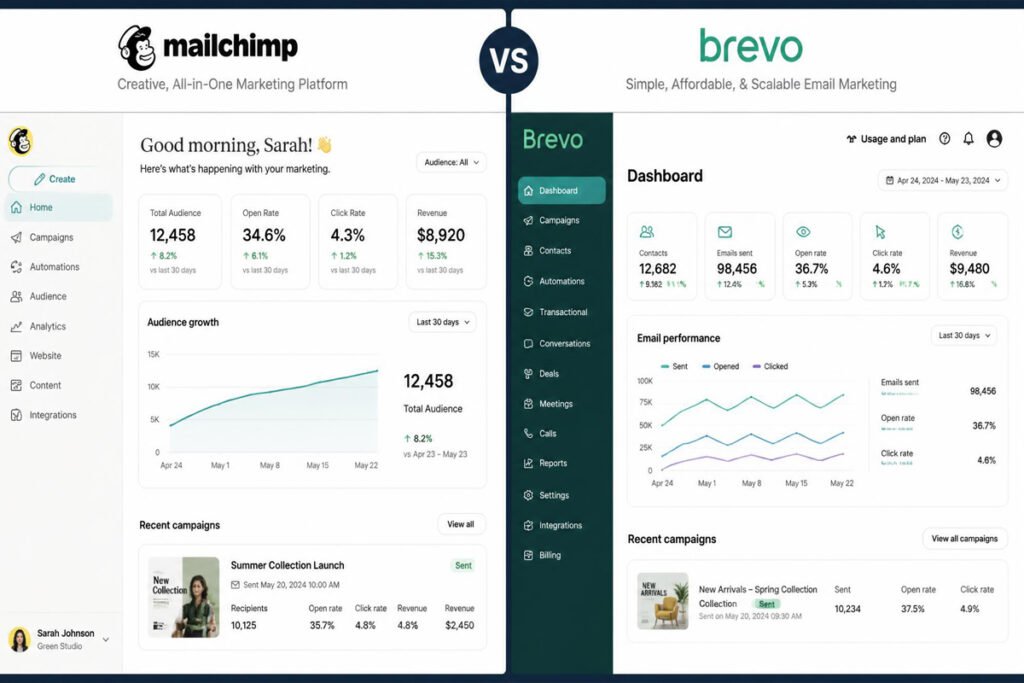
Overview: Mailchimp remains one of the most recognized names in email marketing, and for small businesses starting from zero, that familiarity comes with genuinely solid onboarding and an intuitive drag-and-drop builder.
Key Features:
- Drag-and-drop email builder with no coding required
- AI-assisted design suggestions based on your brand
- Built-in audience segmentation and basic automation
- Broad app and e-commerce integrations
Best For: First-time email marketers who want a well-documented, beginner-friendly platform.
Pros: ✅ Easiest onboarding of the group ✅ Strong template library ✅ Reliable deliverability reputation Cons: ❌ Pricing rises quickly as your list grows ❌ Advanced automation feels basic compared to dedicated tools
Our Verdict: A safe, low-risk starting point — especially useful if email is your first real step beyond social media marketing.
2. MailerLite
Overview: MailerLite is built around simplicity without sacrificing the essentials — automation, landing pages, and sign-up forms are all included even on its free plan, which covers up to 1,000 subscribers.
Key Features:
- Free plan covering core features up to 1,000 subscribers
- Clean, no-fuss drag-and-drop editor
- Built-in landing page and pop-up builder
- Pay-as-you-grow pricing that scales gradually
Best For: Budget-conscious small businesses that still want a genuinely usable feature set.
Pros: ✅ Best value for money in this list ✅ Very low learning curve ✅ Landing pages included, not a separate cost Cons: ❌ Automation logic is simpler than ActiveCampaign’s ❌ Fewer advanced integrations than larger platforms
Our Verdict: The strongest pick when budget is the deciding factor and your automation needs are still fairly straightforward.
3. ActiveCampaign
Overview: ActiveCampaign is built for businesses that have outgrown basic newsletters and need real behavior-based automation — conditional logic, lead scoring, and multi-step journeys tied to what a subscriber actually does.
Key Features:
- Advanced automation builder with conditional branching
- Built-in lead scoring and predictive sending
- Site and event tracking tied directly to email behavior
- CRM-style deal pipeline features included
Best For: Small businesses ready to move past scheduled newsletters into true automation.
Pros: ✅ Most powerful automation engine of the five ✅ Strong for complex, multi-step sequences ✅ Doubles as light CRM functionality Cons: ❌ No free plan ❌ Meaningful learning curve, especially early on ❌ Pricing climbs quickly with contact count
Our Verdict: Worth the learning curve once your content marketing is consistently generating leads that need nurturing, not just a monthly newsletter.
4. Constant Contact
Overview: Constant Contact leans into hands-on support and simplicity, which makes it a strong fit for small business owners who want a real person to call when something breaks, not just a help center article.
Key Features:
- Live customer support included across plans
- Straightforward campaign and event-marketing tools
- Social media posting features bundled in
- Simple reporting focused on the metrics that matter most
Best For: Non-technical teams who value support over advanced automation depth.
Pros: ✅ Genuinely responsive support ✅ Easy to learn quickly ✅ Good for combining email and light social posting Cons: ❌ Automation is less sophisticated than ActiveCampaign’s ❌ Pricing is on the higher side for the feature depth
Our Verdict: A solid choice if your team would rather call support than troubleshoot alone — worth the slightly higher cost for that peace of mind.
5. Brevo
Overview: Brevo (formerly Sendinblue) bundles email marketing with a built-in CRM and often SMS, aimed at small businesses that want fewer separate subscriptions rather than a best-in-class tool for each function.
Key Features:
- Built-in CRM alongside email marketing tools
- SMS marketing available in the same platform
- Contact-based (not send-based) pricing on many plans
- EU-hosted infrastructure, useful for compliance-conscious teams
Best For: Small businesses that want email, light CRM, and SMS without juggling three subscriptions.
Pros: ✅ Genuinely useful built-in CRM ✅ Contact-based pricing can be cost-effective for infrequent senders ✅ SMS included, not a pricey add-on Cons: ❌ Automation is less advanced than ActiveCampaign’s ❌ Interface feels less polished than some competitors
Our Verdict: Worth shortlisting if you’d rather consolidate tools than manage a separate CRM and email platform side by side.
Comparison Table
| Platform | Best For | Free Plan | Automation Depth | Learning Curve |
|---|---|---|---|---|
| Mailchimp | First-time email marketers | Yes, limited | Basic–Moderate | Easy |
| MailerLite | Budget-conscious small teams | Yes, up to 1,000 contacts | Moderate | Easy |
| ActiveCampaign | Advanced behavior-based automation | No | Advanced | Moderate–Steep |
| Constant Contact | Support-first, non-technical teams | No (trial only) | Basic–Moderate | Easy |
| Brevo | Email + CRM + SMS in one platform | Yes, limited | Moderate | Moderate |
Best Email Marketing Platform for Different Business Types

Solo Founders & Very Small Teams
Start with MailerLite’s or Mailchimp’s free tier. At this stage, the priority is building the habit of sending consistently — a monthly or biweekly newsletter linked to whatever you’re already publishing through your content creation work — not chasing advanced automation you don’t need yet.
Lead-Driven Service Businesses
ActiveCampaign tends to fit best once leads are coming in through Google Ads or organic search and need a real nurture sequence, not a single follow-up email. The automation depth pays for itself once volume justifies it.
Local and Retail Businesses
Constant Contact’s combination of email, light social posting, and responsive support suits owners who are managing marketing alongside day-to-day operations and want fewer moving parts to troubleshoot alone.
How to Set Up Your Email Marketing Correctly
Step 1: Build Your List the Right Way
Start with people who’ve actually opted in — customers, newsletter sign-ups, downloaded resources. Buying or scraping a list damages deliverability fast and undermines everything after this step.
Step 2: Set Up One Welcome Sequence First
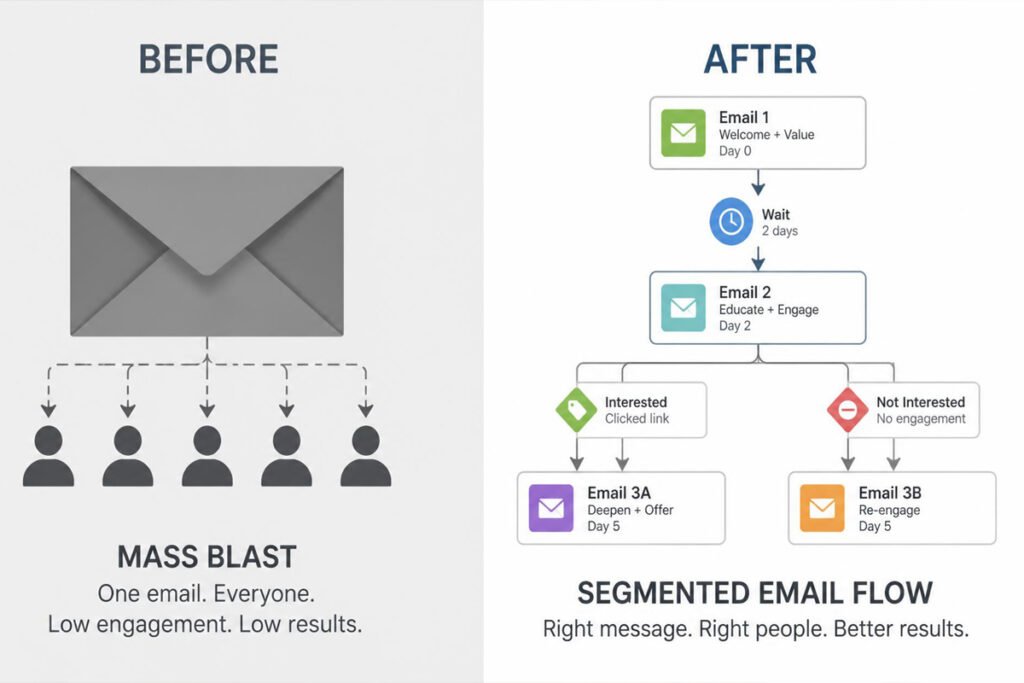
Before building ten campaigns, build one: a simple 2–3 email welcome sequence that introduces new subscribers to what you do. This single automation typically outperforms most one-off newsletters.
Step 3: Segment by Behavior, Not Just Demographics
Group subscribers by what they’ve clicked or bought, not just who they are. A segment based on actual interest converts far better than a broad, unsegmented blast.
Step 4: Test Subject Lines Before Scaling Sends
Most platforms in this list include basic A/B testing. Use it on subject lines before assuming a campaign “didn’t work” — often it’s the open rate, not the content, that needs fixing.
Step 5: Review Deliverability, Not Just Open Rates
Check your sender reputation and spam complaint rate monthly, not just how many people opened. A shrinking inbox placement rate is a warning sign long before open rates visibly drop.
Common Email Marketing Mistakes
Sending the same message to everyone on the list. Broad, unsegmented blasts train subscribers to ignore you. Even basic segmentation — new vs. returning customers — meaningfully improves engagement.
Choosing a platform based on price alone, then hitting a wall. A cheap plan that can’t handle real automation often costs more in the long run through a painful platform switch — the same trap covered in our digital marketing mistakes roundup.
Treating email as a one-way broadcast. The businesses that get the most from email treat replies as a real channel, not noise — a quick reply to an engaged subscriber often does more for trust than another campaign.

Expert Tips
Write subject lines like a person, not a marketer. Subject lines that sound like they came from an actual person outperform obviously “marketing” phrasing more often than not — test both styles and let your open rates decide.
Reuse your best-performing content across channels. A high-engagement email can become a social media post, and vice versa — you don’t need entirely separate content plans for each channel.
Don’t over-automate too early. A handful of well-built sequences beats a dozen half-finished ones nobody’s reviewed in months. Start simple, and only add complexity once the basics are consistently working.
Final Thoughts
Best overall for beginners: Mailchimp, for its onboarding and template library. Best budget pick: MailerLite, for genuine features at a low cost. Best for advanced automation: ActiveCampaign, once your list justifies the learning curve. Best for hands-on support: Constant Contact. Best for consolidating tools: Brevo, if you want email, CRM, and SMS in one place.
Whichever you choose, email marketing works best as part of a connected system — not an isolated channel. If you haven’t already paired it with a CRM to track what happens after the click, or a content marketing strategy to keep your list growing, those are the natural next steps.
Frequently Asked Questions
Is email marketing still effective in 2026, or has it been replaced by social media? It’s still one of the highest-ROI channels available, largely because you own the list — unlike social platforms, where reach depends on an algorithm you don’t control.
How big does my list need to be before email marketing is worth it? There’s no strict minimum. Even a few hundred engaged subscribers can generate meaningful revenue if the content is relevant and consistent.
What’s the difference between a newsletter and marketing automation? A newsletter is a scheduled, one-time send to your whole list. Automation triggers based on subscriber behavior — a welcome series, an abandoned-cart reminder — without you manually hitting send each time.
Do I need a free or paid plan to get started? Free plans (Mailchimp, MailerLite, Brevo) are genuinely usable for small lists and are a reasonable way to test a platform before committing to a paid tier.
How often should a small business send marketing emails? Most small businesses do well sending weekly to biweekly. Sending too rarely causes subscribers to forget you; sending too often increases unsubscribes and spam complaints.
Can I use email marketing software without a dedicated designer? Yes — every platform in this list includes a drag-and-drop builder specifically so non-designers can produce professional-looking campaigns.
What’s a good open rate to aim for? Averages vary by industry, but most small businesses should treat anything meaningfully below their own historical average as a signal to test subject lines or clean the list, rather than chasing a universal benchmark.
Should email marketing and CRM be the same tool, or separate? It depends on complexity. Simple needs are often well served by one combined tool (like Brevo); businesses with more complex sales processes often do better with a dedicated CRM and a specialized email platform working together.
What’s the biggest reason small businesses abandon their email marketing platform? Usually inconsistent sending, not the platform itself — a tool switch rarely fixes a habit problem. Building a sustainable cadence matters more than which platform you choose.
Author: DIGI MONETIZE Team Last Updated: August 2026