
You already know the job market is shifting. Maybe you’ve felt it directly — a role that didn’t exist five years ago suddenly showing up in every job posting, or a skill you spent years building quietly sliding down the “required” list. The uncomfortable part isn’t that skills are changing. It’s that most people are trying to keep up the old way: a bookmarked course they never finish, a YouTube tutorial abandoned at the twelve-minute mark, a certificate that took three months to earn and already feels dated.
AI tools are changing that math. Instead of learning on a fixed schedule someone else designed, you can now get a personalized curriculum, instant feedback, and practice that adapts to exactly where you’re stuck — in the time it used to take to find a decent course. If you’ve already read our guide on future-proof skills companies are hiring for in 2026, this article is the practical next step: the actual tools that help you build those skills faster.
This guide breaks down the best AI-powered learning tools available right now, how to pick the right one for your situation, and how to avoid the mistakes that turn “I’m learning with AI” into another abandoned tab.
Quick Answer
The best AI tool for learning new skills depends on what you’re trying to build. If you want structured courses with AI-adjusted pacing, platforms like Coursera Coach or Khan Academy’s Khanmigo work well. If you’re building a coding or technical skill, GitHub Copilot and Replit’s AI Agent teach you by having you build real projects with guidance. If you want a personal AI tutor for anything — language, writing, concepts — ChatGPT or Claude used deliberately as a study partner outperforms most static courses. For quick, byte-sized skill practice on the go, apps like Duolingo Max (languages) apply AI to make repetition less repetitive. The one-sentence principle: pick the tool that matches how you actually learn — by doing, by talking through ideas, or by structured repetition — rather than the one with the flashiest marketing.

Table of Contents
- What Are AI Learning Tools and How Do They Work?
- How to Choose the Right AI Tool for Your Learning Goal
- Best AI Tools to Learn New Skills in 2026
- Comparison Table
- Best AI Tools for Different Skill Types
- How to Use AI Tools to Learn a New Skill Correctly
- Common Mistakes
- Expert Tips
- Final Thoughts
- Frequently Asked Questions
What Are AI Learning Tools and How Do They Work? {#what-are-ai-learning-tools}
AI learning tools use large language models, adaptive algorithms, and personalized feedback loops to change how a skill is taught based on how you’re actually performing — not a fixed lesson plan built for an average learner. Where a traditional course delivers the same video to everyone, an AI tool to learn skills faster can notice that you’ve made the same mistake three times, slow down, generate a new practice problem targeting exactly that gap, and explain it a different way until it clicks.
This matters because skill decay is accelerating. According to the World Economic Forum’s Future of Jobs Report, employers expect a large share of core workplace skills to change by 2030, and the majority of companies are already prioritizing reskilling and upskilling as a top workforce strategy (World Economic Forum). AI-assisted learning is one of the few methods that can plausibly keep pace with that speed of change, because it removes the bottleneck of waiting for a human instructor or a fixed curriculum to catch up.
If you’re also working on your resilience toolkit for the changes ahead, our personal development trends for 2026 piece covers how AI-driven growth fits into the bigger picture of staying adaptable.
How to Choose the Right AI Tool for Your Learning Goal {#how-to-choose}
Before picking a tool, ask yourself three questions:
1. Am I learning a skill or a subject? Skills (coding, design, negotiation) benefit from tools that let you practice with feedback. Subjects (history, theory, concepts) benefit from tools that let you ask questions and get explanations.
2. How much structure do I need? If you thrive on a syllabus with deadlines, choose a platform-based AI tool layered onto structured courses. If you learn better exploring at your own pace, a conversational AI assistant gives you more freedom.
3. Do I need to prove the skill to someone else? If a certificate or credential matters for your job search, prioritize tools tied to accredited platforms over general-purpose AI chat tools, since the latter won’t give you anything to put on a resume.
Whatever you choose, pairing it with real practice matters more than the tool itself — a pattern that shows up across our guide to in-demand skills that can help you earn more.
Best AI Tools to Learn New Skills in 2026 {#best-tools}
1. Khanmigo (Khan Academy)
Overview: Khanmigo is Khan Academy’s AI tutor, built directly into its free learning platform. It walks you through problems Socratically instead of just handing you the answer, which makes it especially strong for math, science, and academic-style skill-building.
Key Features:
- Step-by-step guided tutoring instead of direct answers
- Covers K-12 through early college-level subjects
- Integrates with Khan Academy’s existing free course library
- Progress tracking tied to mastery, not just completion
Best For: Learners who want a structured, guided approach with accountability built in.
Pros: ✅ Free or low-cost for individuals ✅ Backed by a nonprofit with strong educational design ✅ Doesn’t just give away answers Cons: ❌ Less useful for niche professional/technical skills ❌ Interface skews toward academic subjects
Our Verdict: A strong starting point if you’re rebuilding foundational skills — math, writing mechanics, logical reasoning — before moving into more specialized tools. Pairs well with our 10 best soft skills books for a well-rounded self-study plan.
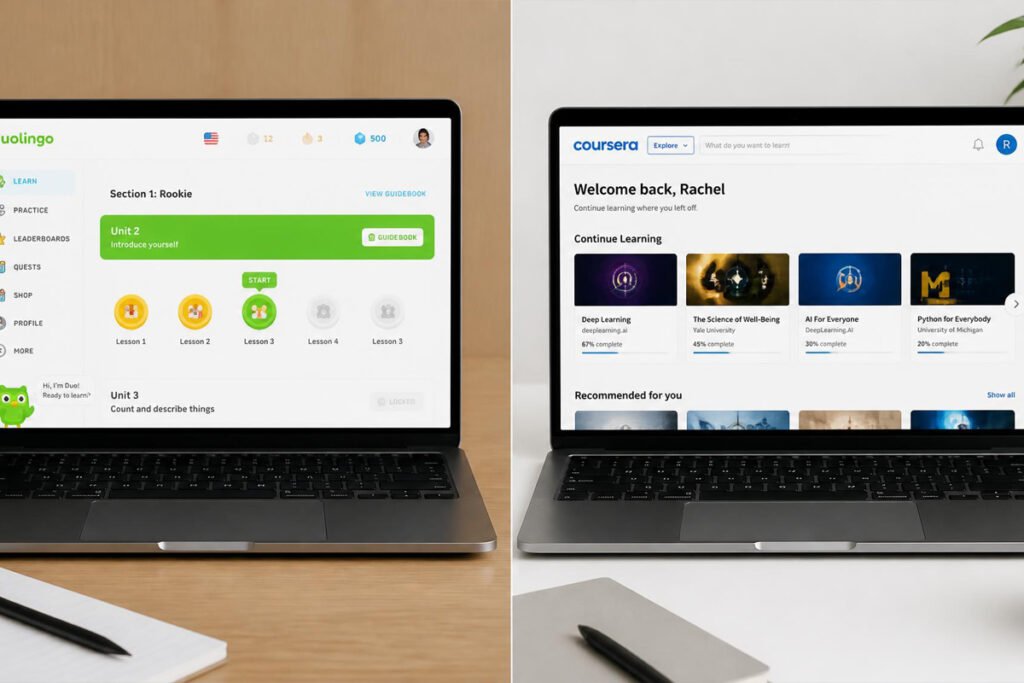
2. Coursera Coach
Overview: Coursera’s built-in AI coach summarizes lessons, quizzes you on material, and answers questions about course content in real time, layered on top of Coursera’s existing accredited course catalog.
Key Features:
- AI chat embedded directly inside paid courses
- Summarizes long video lectures into key takeaways
- Generates custom practice quizzes from course material
- Works across thousands of university and industry courses
Best For: People who want credentialed learning (certificates, specializations) sped up with AI support.
Pros: ✅ Certificates you can add to LinkedIn/resume ✅ AI support doesn’t replace instructor-designed curriculum, it accelerates it ✅ Wide range of professional subjects Cons: ❌ Requires a paid subscription for full access ❌ AI coach is only as good as the course it’s attached to
Our Verdict: Best pick if the end goal is a credential for a job application, not just personal knowledge. Combine it with our freelancing skills you can learn online guide if you’re building a portfolio alongside the certificate.
3. Claude or ChatGPT as a Study Partner
Overview: General-purpose AI assistants aren’t built specifically as learning platforms, but used deliberately — asking for explanations at your level, requesting quizzes, or talking through a concept out loud — they function as an on-demand tutor for almost any subject.
Key Features:
- Can explain any topic at any level of depth on request
- Generates custom practice questions and scenarios
- Available 24/7 with no course structure required
- Works for both technical skills and soft skills (writing, negotiation scripts, interview prep)
Best For: Self-directed learners who want maximum flexibility and no fixed curriculum.
Pros: ✅ Extremely flexible, works for almost any skill ✅ No cost barrier at the free tier ✅ Great for “explain this differently” moments Cons: ❌ No built-in accountability or progress tracking ❌ Can occasionally give inaccurate information, so fact-check technical claims
Our Verdict: The best low-cost entry point for AI-assisted learning, especially if you already know what you’re trying to learn and just need a patient, always-available explainer. Works particularly well alongside our 50 daily habits framework if you turn “10 minutes with an AI tutor” into a daily habit.
4. GitHub Copilot / Replit AI Agent
Overview: For coding specifically, these tools teach by doing — you build real, working projects while the AI suggests code, explains what it’s doing, and flags errors in context.
Key Features:
- Real-time code suggestions with explanations
- Works inside the same environment you’ll code in professionally
- Learn-by-building rather than learn-by-watching
- Available across most popular programming languages
Best For: Anyone building coding or technical skills who wants project-based learning.
Pros: ✅ You end up with real, usable projects ✅ Mirrors how coding is actually done on the job ✅ Faster feedback loop than traditional tutorials Cons: ❌ Can create over-reliance if you never learn to code without assistance ❌ Steeper learning curve for total beginners
Our Verdict: The strongest option if your target skill is technical and you learn best by building. It fits naturally into the technical-skill track discussed in our 10 digital skills you can learn at home and monetize article.
5. Duolingo Max
Overview: Duolingo’s AI-powered tier adds conversational roleplay and “explain my answer” features on top of its existing gamified language-learning system.
Key Features:
- AI conversation practice in the target language
- Explains why an answer was right or wrong on demand
- Bite-sized daily sessions built for habit formation
- Gamified streaks and progress tracking
Best For: Learning a new language in small, consistent daily sessions.
Pros: ✅ Extremely habit-friendly, easy to stick with ✅ Low time commitment per session ✅ Makes conversational practice accessible without a tutor Cons: ❌ Limited to language learning ❌ Advanced fluency still requires real conversation practice
Our Verdict: If language is your target skill, this remains one of the easiest ways to build a daily habit around it — see our 20 tiny habits that can transform your life for more on why small, consistent sessions beat occasional long ones.

Comparison Table {#comparison-table}
| Tool | Best For | Cost | Credential? | Learning Style |
|---|---|---|---|---|
| Khanmigo | Foundational academic skills | Free/Low-cost | Limited | Guided, Socratic |
| Coursera Coach | Career credentials | Paid subscription | Yes | Structured courses |
| Claude / ChatGPT | Any skill, max flexibility | Free tier available | No | Conversational |
| GitHub Copilot / Replit | Coding & technical skills | Paid (free trials) | No | Project-based |
| Duolingo Max | Language learning | Paid tier | No | Gamified, habit-based |
Best AI Tools for Different Skill Types {#different-skill-types}
For Career and Professional Skills
If your goal is a skill that shows up on a resume — data analysis, project management, digital marketing — pairing a credentialed platform like Coursera Coach with a general AI assistant for daily Q&A gives you both structure and flexibility. This combination is especially effective if you’re also targeting remote job skills companies are hiring for right now, since remote-friendly roles are often the same ones AI tools can help you build fastest.
For Creative and Communication Skills
Writing, public speaking, and creative skills benefit most from conversational AI tools that let you draft, get feedback, and revise in real time. Ask the AI to critique your work the way a specific type of reader would — a hiring manager, a client, a skeptical colleague — to practice adapting your communication style.
For Technical and Coding Skills
Project-based tools like GitHub Copilot or Replit’s AI Agent outperform passive tutorials because you’re producing something real while you learn. Set a rule for yourself: try to solve the problem before asking the AI, then compare your approach to its suggestion. That single habit prevents the over-reliance issue that trips up a lot of beginners.

How to Use AI Tools to Learn a New Skill Correctly {#how-to-use}
Employers surveyed for the World Economic Forum’s Future of Jobs Report increasingly cite continuous learning and reskilling as a top workforce priority, which means how you learn is starting to matter almost as much as what you learn (World Economic Forum). Here’s a simple process that works across almost any AI learning tool:
Step 1: Define the Specific Skill, Not a Broad Topic
“Learn Python” is too broad. “Be able to write a script that cleans a CSV file” is specific enough for an AI tool to build a real practice path around.
Step 2: Set Up a Baseline Test
Before you start, ask the AI tool to quiz you or assess your current level. This gives you a clear before/after comparison and stops you from re-learning things you already know.
Step 3: Practice in Short, Focused Sessions
15–25 minute sessions with a specific goal outperform long, unfocused ones. This is where habit-based tools like Duolingo Max shine, but the principle applies to any tool.
Step 4: Ask the AI to Explain Your Mistakes, Not Just Correct Them
The learning happens in the explanation, not the correction. Always ask “why was this wrong?” instead of just accepting the fix.
Step 5: Apply the Skill Somewhere Real
Move what you’ve learned into a real project, a work task, or a portfolio piece within a week. Skills that stay inside the learning tool tend to fade fast.
Common Mistakes {#common-mistakes}
Treating AI tools as a replacement for practice, not a supplement to it. Watching an AI explain a skill feels like progress, but skills are built by doing, not by understanding. Pair every AI learning session with a related task from our freelancing skills to learn online guide to force real application.
Learning too many skills at once. AI tools make starting something new frictionless, which tempts people into juggling five skills instead of finishing one. Pick one priority skill from our future-proof skills list and stay with it for at least a month before adding another.
Skipping the habit-building step. The people who actually finish AI-assisted learning paths are the ones who build a consistent daily or weekly habit around it, not the ones who rely on motivation. Our 50 daily habits article breaks down exactly how to make a new habit stick.
Expert Tips {#expert-tips}
Use AI to generate “what would a hiring manager ask” practice scenarios. Instead of only learning the skill, ask your AI tool to simulate an interview question or real workplace scenario that tests it. This closes the gap between “I understand this” and “I can perform this under pressure.”
Track your sessions the same way you’d track a habit. Tools like the ones in our best time-blocking planners guide work well for scheduling recurring AI-learning blocks so they don’t get pushed aside by urgent tasks.
Protect focus time before you start. AI-assisted learning sessions work best without interruptions. If your workspace is noisy, our noise-cancelling headphones for deep work roundup covers options that make focused practice sessions easier to protect.

Final Thoughts {#final-thoughts}
Best overall: Coursera Coach, if you want a credential attached to your effort. Best budget: Claude or ChatGPT’s free tier, if flexibility matters more than structure. Best for beginners: Khanmigo, if you’re rebuilding foundational skills before specializing. Best for consistency: Duolingo Max, if habit formation is your biggest obstacle.
Whichever tool you pick, the tool itself is only half the equation — the other half is the system around it. Pair your chosen AI tool with a stress-management routine (see our best meditation apps for stress management) so burnout doesn’t derail your progress, and revisit our personal development trends for 2026 piece periodically to make sure the skills you’re building still match where the market is heading.
Frequently Asked Questions {#faq}
Do I need to pay for an AI tool to learn a new skill effectively? No. Free tiers of tools like Claude, ChatGPT, and Khan Academy’s Khanmigo are strong enough for most self-directed learning. Paid tools mainly add credentials, deeper course libraries, or more advanced features — useful, but not required to start.
How long does it take to learn a new skill using AI tools? It depends heavily on the skill and your consistency, but most people see meaningful progress on a focused skill within 4–8 weeks of regular, short practice sessions, faster than traditional self-paced courses because feedback is immediate.
AI tutoring vs. traditional online courses — which is better? They’re complementary rather than competing. Traditional courses provide structure and credentials; AI tutoring provides personalized pacing and instant feedback. The strongest results usually come from combining both, as covered in the Coursera Coach section above.
Why do I keep abandoning AI-assisted learning after a few days? Usually because the sessions aren’t tied to a habit or a specific goal. Set a fixed time, a specific skill target, and track it the way you would any other habit — see our 20 tiny habits guide for a simple framework.
Is it safe to trust AI tools for technical or factual learning? Mostly, but always verify critical technical details independently, especially for coding, medical, legal, or financial information. AI tools are excellent at explaining and practicing but can occasionally state something incorrectly with confidence.
Can AI tools help with soft skills, not just technical ones? Yes. Conversational AI tools are particularly strong for practicing negotiation scripts, difficult conversations, interview answers, and communication styles, since you can roleplay a scenario and get immediate feedback.
What’s the difference between AI tutoring tools and just using ChatGPT? Purpose-built tools like Khanmigo or Coursera Coach are tied to structured curricula and often include progress tracking or credentials. General AI assistants like ChatGPT or Claude offer more flexibility but require you to build your own structure.
Will AI tools replace human teachers or mentors? Unlikely in the near term. AI tools are best used as a supplement — for practice, explanation, and pacing — while human mentors still provide context, accountability, and industry-specific judgment that’s harder to replicate.
How do I know which skill to prioritize learning first? Start with the skill most directly tied to your next career move or income goal. Our in-demand skills that can help you earn more guide is a good starting filter.
Do employers actually value skills learned through AI tools? Employers generally care about demonstrated ability, not how you learned it. A portfolio project, a certificate, or a strong interview answer built from AI-assisted learning carries the same weight as one built any other way — what matters is the outcome, not the method.
Author: Jhon Last Updated: August 2026